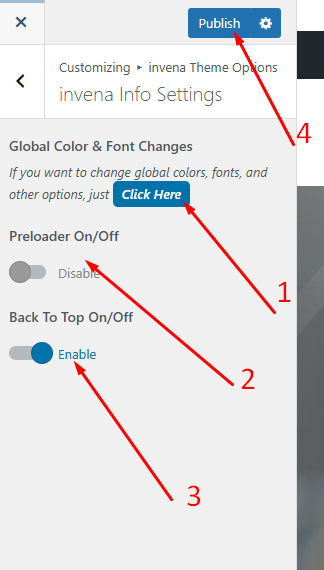
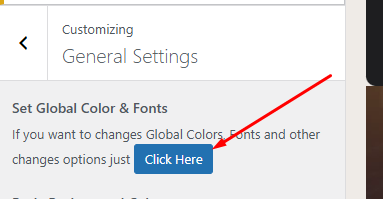
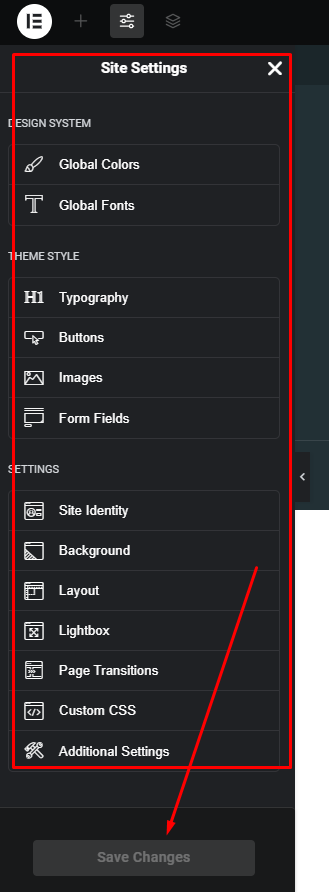
Requirements Getting Start Theme Installation Required Plugins [1] Plugins Documentation and Video Tutorials Importing Demo Content How To Set Default Home Page Theme Customization [6] Site Identity invena Info Settings Blog Settings Blog Single Settings Portfolio Settings 404 Page Portfolio [2] Create New Portfolio Edit Portfolio Content Teams [2] Create New Team Edit Team Content Edit Header Information Edit Footer Information Menus Create & Setup [2] Mega Menu [1] Mega Menu Edit Widgets & Sidebar Elementor Widget Slider Revolution Troubleshooting [2] Demo content installation Failed 404 Error in all pages Update The Theme [3] Envato Market Plugin Manual Update Update by FTP Locate your Envato Item Purchase Code Contact Translations Home / Documentation / Invena – Business Consulting WordPress Theme / Theme Customization invena Info Settings Appearance -> Customizer -> invena Theme Options -> invena Info Settings Global Color & Font Changes Preloader On/Off Back To Top On/Off Publish Your all Changes Elementor Global Color & Typography Change Doc navigation < Site Identity Blog Settings > Was this page helpful? Yes No Leave a Reply Cancel replyYour email address will not be published. Required fields are marked *Comment * Name* Email* Website Save my name, email, and website in this browser for the next time I comment.